Document Layout Analysis Example
Document Layout Analysis is used to identify and extract the layout structure of documents, including text blocks, images, tables, and other elements.
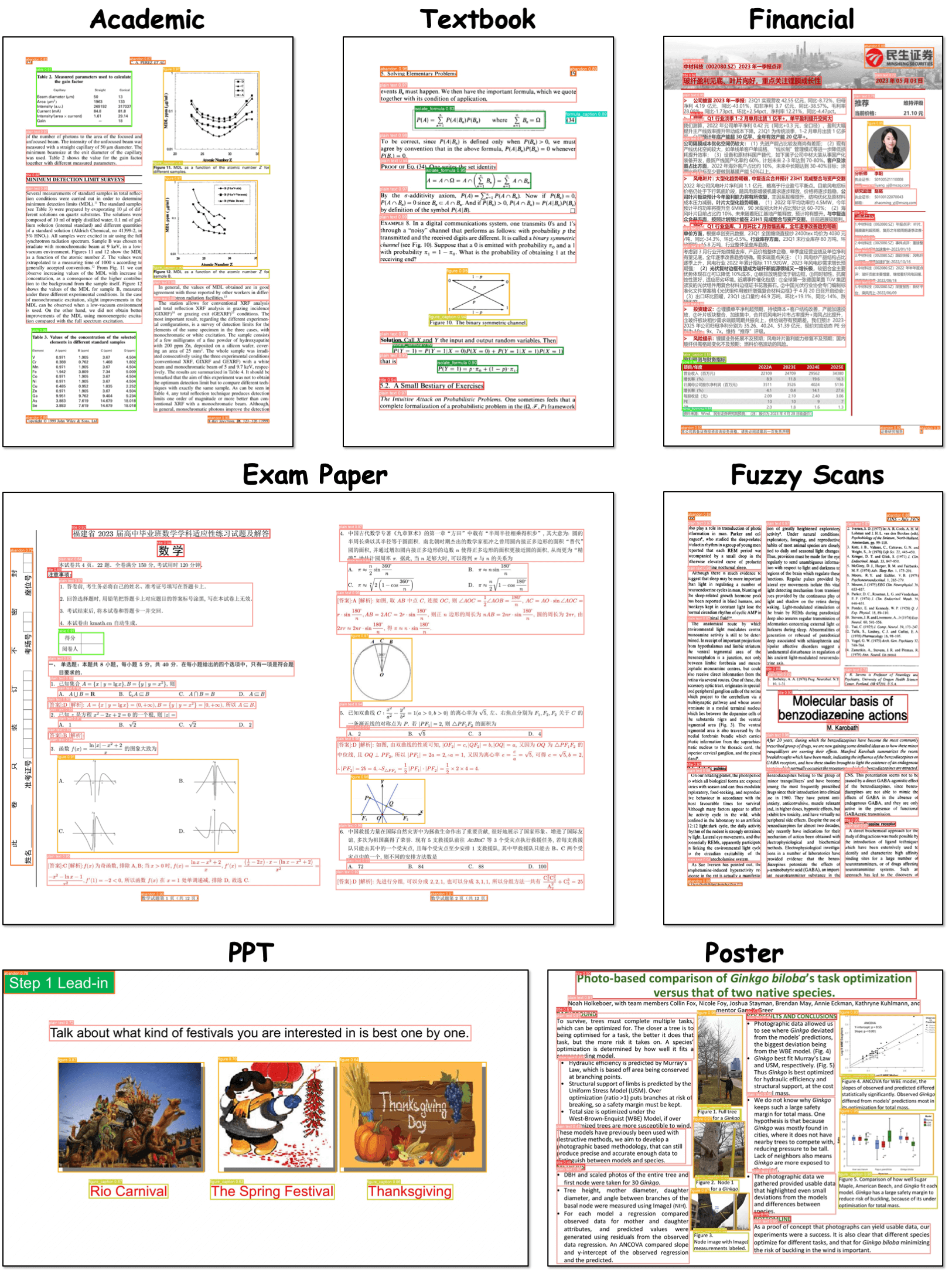
DocLayout-YOLO
Introduction
DocLayout-YOLO is a real-time and robust layout detection model for diverse documents, based on YOLO-v10. This model is enriched with diversified document pre-training and structural optimization tailored for layout detection.
Usage
- Import images (
Ctrl+I) or a video (Ctrl+O) into X-AnyLabeling. - Select and load the DocLayout-YOLO model.
- Click
Run (i)to process the current image. After checking the result, pressCtrl+Bto process all images.
PP-DocLayoutV3
Introduction
PP-DocLayoutV3 is specifically engineered to handle non-planar document images. It can directly predict multi-point bounding boxes for layout elements—as opposed to standard two-point boxes—and determine logical reading orders for skewed and curved surfaces within a single forward pass, significantly reducing cascading errors.
This model is an essential component of PaddleOCR-VL-1.5, providing crucial layout analysis for the high-precision parsing of various real-world documents.
Supported Labels
PP-DocLayoutV3 supports 25 layout element categories:
| Category | Labels |
|---|---|
| Document Structure | doc_title, paragraph_title, header, footer, content, reference, reference_content |
| Text Elements | text, vertical_text, aside_text, abstract, footnote, vision_footnote |
| Visual Elements | image, chart, figure_title, header_image, footer_image, seal |
| Math & Formulas | inline_formula, display_formula, formula_number, algorithm |
| Tables | table |
| Other | number |
Installation
You'll need to get X-AnyLabeling-Server up and running first. Check out the installation guide for the details. Make sure you're running at least v0.0.7 of the server and v3.3.9 of the X-AnyLabeling client, otherwise you might run into compatibility issues.
PP-DocLayoutV3 requires the latest transformers development branch. Install it with:
pip install --upgrade git+https://github.com/huggingface/transformers.git
For more details, see the official model page.
Once that's done, head over to configs/models.yaml and enable pp_doclayout_v3. There's an example config you can reference if you're not sure how to set it up.
You can tweak the settings in pp_doclayout_v3.yaml to fit your needs.
Usage
Launch the X-AnyLabeling client, press Ctrl+A or click the AI button in the left menu bar to open the auto-labeling panel. In the model dropdown list, select Remote-Server, then choose PP-DocLayoutV3.