Image Matting Example
Introduction
| Image | Result |
|---|---|
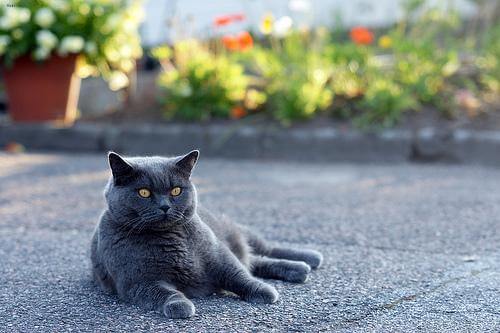 | 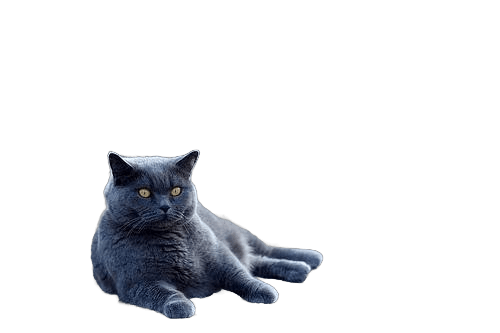 |
Image Matting is the process of accurately estimating the foreground object in images and videos. It is a very important technique in image and video editing applications, particularly in film production for creating visual effects.
Available Models
- RMBG v1.4: Faster processing with good quality results
- RMBG v2.0: Higher quality results with increased processing time
- RMBG v2.0 Quantized: Optimized version of v2.0 with better CPU performance
Usage
- Import images (
Ctrl+I) or a video (Ctrl+O) into X-AnyLabeling. - Select and load the desired model version (
RMBG v1.4,RMBG v2.0, orRMBG v2.0 Quantized). - Click
Run (i)to process the current image. After checking the result, pressCtrl+Bto process all images.
The output, once completed, will be automatically stored in a x-anylabeling-matting subdirectory within the same folder as your original image.
Performance Benchmark
Performance test processing 10 images with different model configurations:
| Model Version | Device | Processing Time (seconds) |
|---|---|---|
| RMBG v1.4 | GPU | 2 |
| RMBG v1.4 | CPU | 9 |
| RMBG v2.0 | GPU | 13 |
| RMBG v2.0 | CPU | 122 |
| RMBG v2.0 Quantized | GPU | 55 |
| RMBG v2.0 Quantized | CPU | 105 |
Test Environment
- CPU: 13th Gen Intel(R) Core(TM) i5-13600K
- GPU: NVIDIA GeForce RTX 3060 (12GB VRAM)
Note
RMBG v2.0 models are significantly slower on CPU. For optimal performance, GPU acceleration is highly recommended.