X-AnyLabeling v4: Building a Unified Data Engine for Human-in-the-Loop Vision Systems


Modern vision models can detect an object, segment it, track it through a video, read the text inside it, or describe it in natural language. Yet producing a reliable dataset is still much harder than running inference once. Predictions arrive in incompatible forms; model errors must be corrected without discarding useful work; relationships between objects need to survive export; and every accepted annotation should remain traceable to the image, frame, or document from which it came.
This is the problem that X-AnyLabeling v4 is designed to address. The project is an open-source, cross-platform desktop system for AI-assisted data annotation and production. It supports text, documents, images, videos, and multimodal data; integrates hundreds of models across detection, segmentation, tracking, OCR, document parsing, and vision-language understanding; and connects annotation, inference, review, training, and model reuse in one environment.
The important change in v4 is not simply a longer model list. It is the consolidation of the system around four layers:
- a small set of editable data primitives;
- task semantics expressed through those primitives;
- dedicated workflows for data that does not fit a generic canvas;
- extension boundaries for models, interfaces, pipelines, and remote compute.
This article develops that architecture from the inside out. The central question is: how can heterogeneous model outputs become durable data rather than disposable predictions?
Table of Contents
- The gap between inference and data production
- A common representation for visual data
- The human-in-the-loop annotation cycle
- From primitives to task families
- Why some tasks need dedicated workflows
- Closing the loop with training
- Scaling inference without making the client heavy
- Extension as a set of stable boundaries
- A concrete end-to-end example
- Performance and operational details
- Limitations and open questions
- Conclusion
- References
The gap between inference and data production
A model prediction is an answer at a moment in time. A dataset is a maintained body of evidence.
That distinction creates several engineering requirements that are easy to miss in a model-centric view of annotation:
- A prediction must be editable. If a mask is almost correct, the user should repair its boundary rather than redraw it or rerun the entire model.
- Its semantics must be explicit. A point may be a pose keypoint, a landmark, an object center, or a visual prompt; geometry alone is not enough.
- Relationships must be preserved. A person box and its keypoints belong to the same instance; a document key must be linked to its value; detections across video frames must retain identity.
- Review state must be first-class. A generated label is not equivalent to a verified label, even if they share the same geometry.
- The result must be portable. Training pipelines often expect YOLO, COCO, DOTA, MOT, masks, or OCR-specific formats rather than an application's internal state.
Many annotation systems handle these concerns as separate features. X-AnyLabeling takes a different route: it maps them onto a common internal representation and lets task-specific behavior build on top of it.
This design matters because the cost of annotation rarely comes from drawing the first box. It comes from the repeated transitions around that box: generating it, correcting it, assigning attributes, finding similar errors, checking the dataset, converting the result, training a model, and returning to the remaining hard cases.
A common representation for visual data
The smallest editable unit in X-AnyLabeling is a shape. A shape combines geometry with task semantics and review metadata. The platform supports nine geometric types:
| Primitive | Geometry | Typical uses |
|---|---|---|
| Rectangle | Two opposite corners, axis-aligned | Detection, tracking, regions of interest |
| Polygon | Three or more boundary vertices | Instance/semantic segmentation, defects, medical regions |
| Rotation | Oriented rectangle | Aerial imagery, scene text, directional objects |
| Quadrilateral | Four unconstrained vertices | Perspective text, documents, plates, screens |
| Point | One coordinate | Pose, landmarks, object centers, visual pointing |
| Line | Two endpoints | Measurements, short edges, directional references |
| Line strip | Open polyline | Lanes, cracks, rivers, trajectories |
| Circle | Center and radius | Cells, holes, gauges, circular parts |
| Cuboid | Constrained 2.5D projection | Vehicles, packages, shelves, spatial perception |

Figure 1. Geometry is kept deliberately small and composable. Task-specific meaning is carried by attributes and relationships rather than by inventing a new canvas object for every model.
Each shape can carry a label, confidence score, coordinates, group_id, description, difficult flag, custom attributes, key-information-extraction links, and type-specific metadata. Geometry can also be locked independently from semantic fields. A reviewer may therefore preserve an approved contour while still correcting its class or attributes.
The interesting part is how composition turns these primitives into richer structures:
- A pose instance is a rectangle plus a set of points connected by one
group_id. - A tracked object is a sequence of shapes whose
group_idremains stable across frames. - An OCR sample is a rectangle, rotation, or quadrilateral whose
descriptionstores the transcription. - A key-value pair in a document is represented by labeled text regions plus an explicit KIE relation.
- Image-level classification and captioning live outside geometry as image flags or descriptions.
This is a normalization layer between models and datasets. A detector, segmenter, OCR engine, and multimodal model may expose very different APIs, but once their outputs are converted into native objects, they share the same editing, filtering, review, statistics, and export machinery.
Why editability is part of the data model
In an interactive system, the representation must support correction efficiently. X-AnyLabeling distinguishes drawing mode from editing mode and adapts editing behavior to each geometry. Rectangles can be resized or merged; polygons support vertex editing, brush expansion, and erasing; oriented boxes expose rotation controls and fine-grained keyboard adjustment; cuboids preserve their structural constraints while the user changes position, size, and depth.
Polygon creation illustrates the same principle. Point-by-point drawing is precise but expensive for long boundaries. The brush mode samples a continuous mouse path and closes the contour near its starting point. The magic-wand mode grows a connected region according to color similarity, providing a lightweight alternative for clear foreground-background boundaries without loading a model.
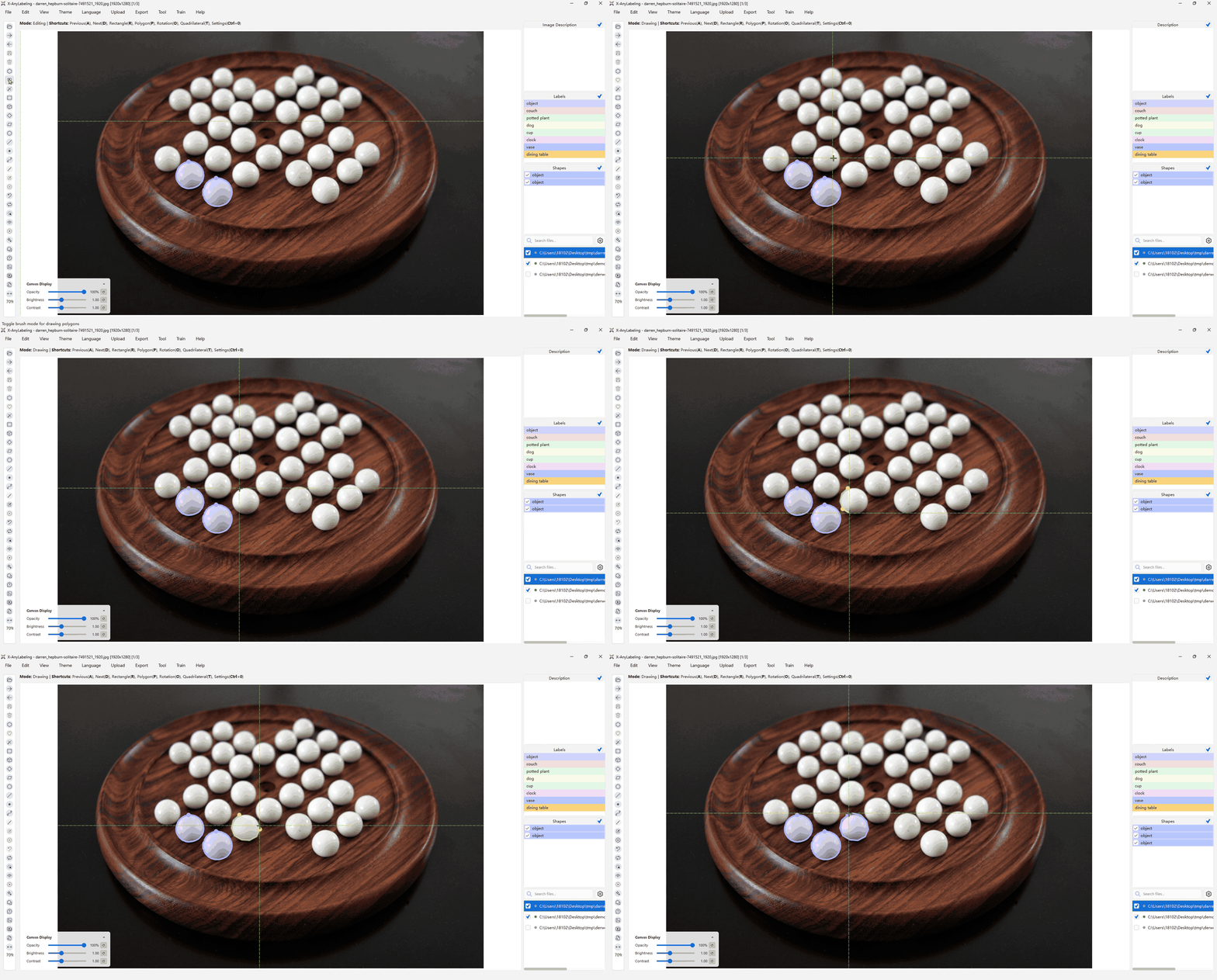
Figure 2. The brush converts a continuous gesture into polygon vertices, reducing interaction cost while retaining an editable vector boundary.
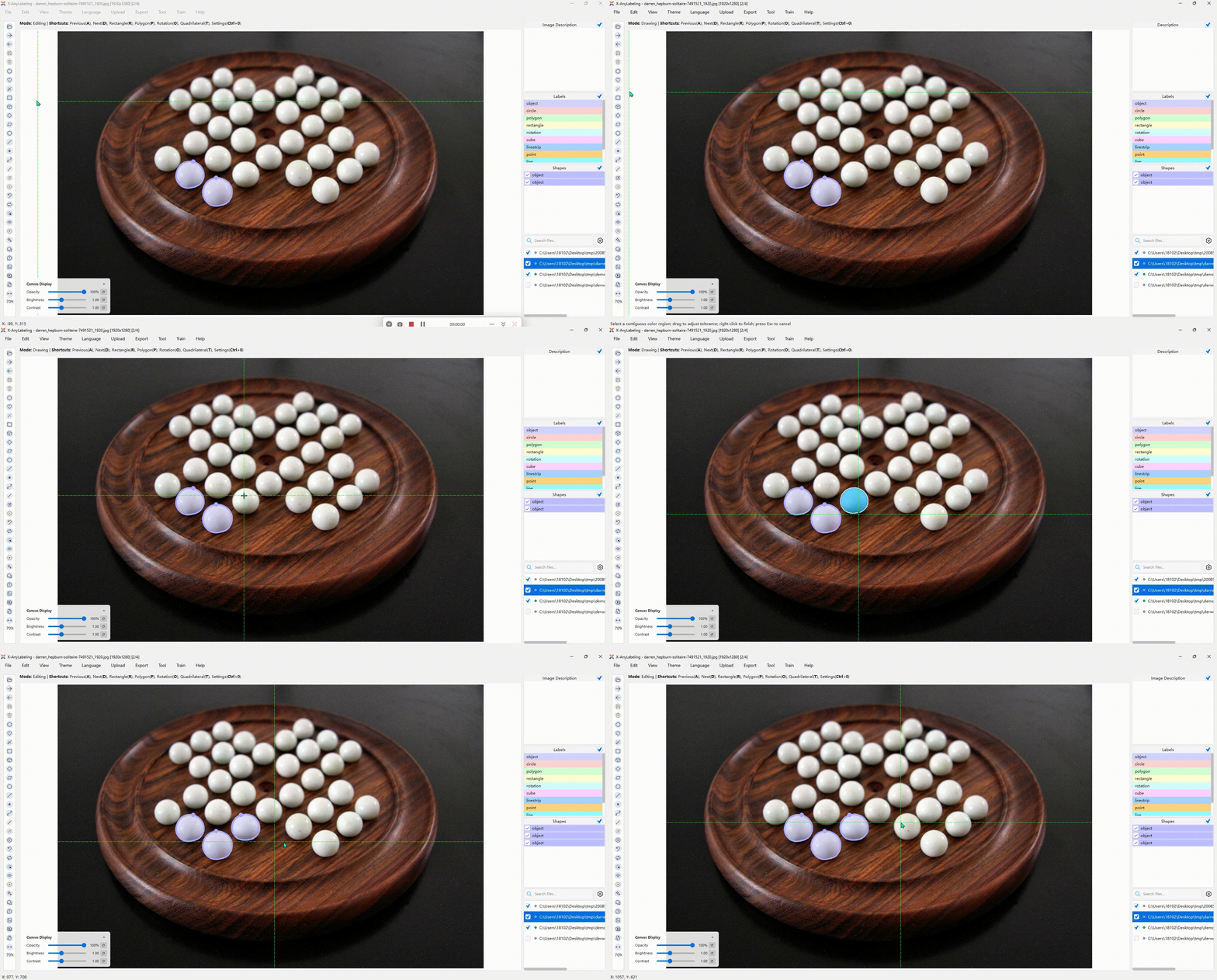
Figure 3. The magic wand uses local pixel connectivity and color similarity. It is useful when a full segmentation model would be unnecessary overhead.
The same philosophy appears in navigation. Opacity, brightness, and contrast affect only the canvas display, never the source image. A navigator provides spatial context for high-resolution images. Loop mode selects objects in sequence, while Zoom mode centers and enlarges each object for boundary inspection. Comparison view aligns same-named images from two directories behind a draggable divider, which is useful for visible/infrared pairs, source/mask inspection, or before/after processing.
These controls do not generate labels, but they determine how cheaply a human can verify them. In a human-in-the-loop system, that cost is as fundamental as inference latency.
The human-in-the-loop annotation cycle
The practical unit of work in AI-assisted labeling is not a model call. It is a cycle:
raw data
   -> model proposal
   -> native editable objects
   -> human correction and acceptance
   -> dataset-level inspection
   -> export or training
   -> improved model
   -> proposals on new or difficult data
X-AnyLabeling v4 supports each transition directly.
Proposal and correction
Models can run locally in the desktop application or remotely through X-AnyLabeling-Server. Their outputs are converted into native shapes or image-level fields. The user can then alter geometry, labels, attributes, descriptions, and relations using the same operations as for manually created annotations.
This removes a common asymmetry: model-generated labels are not a special, opaque layer. After conversion, they are ordinary project data. The model accelerates the first pass; the editor remains the source of truth.
Review as a searchable state
Large annotation jobs fail quietly when review is remembered rather than recorded. X-AnyLabeling stores a checked state for each file and distinguishes reviewed from pending samples in the file list. Users can jump directly to the next unchecked image.
Search works over both filenames and annotation metadata. Queries can locate a file by index, match a regular expression, find low-confidence objects, select a particular label or geometry type, or filter samples by difficult, grouped, described, shaped, or checked state. For example:
| Query | Meaning |
|---|---|
#10 | The tenth item in the current list |
<\.png$> | Files ending in .png |
difficult::true | Images containing at least one difficult object |
label::person | Images containing the label person |
type::cuboid | Images containing a cuboid |
score::[0,0.5] | Images containing a low-confidence prediction |
checked::false | Images not yet reviewed |
This turns review policy into an executable filter. A team can first inspect low-confidence proposals, then difficult samples, then any file without a completed check, instead of treating a folder as a flat sequence.
Dataset-level operations
Once annotations accumulate, the main questions change. Are any classes missing? Is one category severely underrepresented? Which images contain unusual object types? Did a label rename propagate everywhere?
The data overview recomputes statistics from project JSON files and exposes two levels of inspection: a label-by-shape summary and a row-level object table. A suspicious row can link back to its source image, creating a short loop from aggregate anomaly to local correction.

Figure 4. Counts are useful only if they lead back to inspectable samples. The overview connects summary statistics to individual annotations.
Several batch tools operate at the same dataset scope:
- The label manager renames or removes classes and controls per-class visibility.
- The group-ID manager updates or removes related objects over a chosen range.
- The object converter approximates one geometry with another when a downstream task changes its required representation.
- The object manager copies, removes, or propagates selected shapes through a frame range.
- Crop export turns labeled regions into reusable classification samples or review sets.
- Visualization export renders selected labels, scores, and group information into standalone images or videos without modifying source data.
The distinction between data-changing operations and view-only operations is important. Hiding a class should not rewrite the dataset. Renaming it should. Cropping a polygon by its axis-aligned bounding box should not be mistaken for alpha matting. Making these semantics explicit prevents convenient tooling from silently changing the meaning of the data.
Interchange rather than lock-in
The native JSON format preserves editability, but training and evaluation ecosystems use specialized formats. X-AnyLabeling supports import, export, or conversion for formats including YOLO, Pascal VOC, COCO, DOTA, semantic masks, MOT, MOTS, PPOCR, ODVG, MM-Grounding-DINO, and VLM-R1-OVD.
No format can preserve every internal attribute equally well. A conversion is therefore best understood as a projection from the richer project state into the schema required by a downstream task. Keeping the editable source alongside exported artifacts is safer than treating any one export as the master copy.
From primitives to task families

Figure 5. Models are grouped by the kind of evidence they produce, but their results converge on the same editable project representation.
The platform's broad task support follows from the representation above. It is useful to group the tasks by the structure of their output rather than by model brand.
Discrete semantics: classification and tagging
Classification assigns semantics without necessarily creating geometry. At image level, a sample may receive one mutually exclusive class or several compatible labels. At object level, one region may carry multiple attributes: a vehicle can have both a body color and a vehicle type; a person can have clothing and accessory attributes.
These are not interchangeable structures. Flattening every answer into a single class list loses which attribute belongs to which object and which attributes are mutually exclusive. X-AnyLabeling separates image-level state from object-level properties so that the schema retains that distinction.
Open-vocabulary tagging extends this idea. Models such as RAM and RAM++ can generate semantic tags without restricting inference to a narrow, fixed label set. Their outputs are useful for retrieval and dataset exploration, but still require review: broad vocabularies improve recall while also increasing ambiguity and synonym drift.
Spatial localization: boxes, rotated boxes, and open vocabulary
Axis-aligned object detection remains the most common localization task. X-AnyLabeling integrates detector families such as YOLO, RT-DETR, RF-DETR, and D-FINE, then exposes their boxes as editable rectangles. For high-resolution images with dense small objects, sliced inference can preserve local detail and remap results to the full image.
Oriented detection changes the geometry, not the surrounding workflow. A rotated box represents scale and direction more tightly for ships, aircraft, scene text, or industrial parts. The result can be refined interactively and exported to formats such as YOLO OBB or DOTA.
Open-vocabulary detection changes the class interface. Instead of selecting only from a training-time label set, a user may define the target with text or a visual example. Text prompts work well for nameable concepts; visual prompts help when appearance is easier to demonstrate than describe. Models such as YOLOE, SAM 3, and LocateAnything make these modes available inside the same annotation loop. Where a model supports feature reuse, repeated prompt refinement can avoid recomputing the full image encoding.
Pixel-level structure: segmentation and matting
Semantic segmentation assigns a class to every pixel but does not distinguish instances. Instance segmentation preserves separate identities for objects of the same class. Both can be represented with editable polygons and exported as masks, but their semantics differ through class and instance organization.
General-purpose segmentation models—including the SAM family, SAM-HQ, EdgeSAM, EfficientViT-SAM, and MobileSAM—reduce the cost of producing an initial boundary. A point or box prompt yields a mask; polygon and brush tools handle the local corrections that remain.
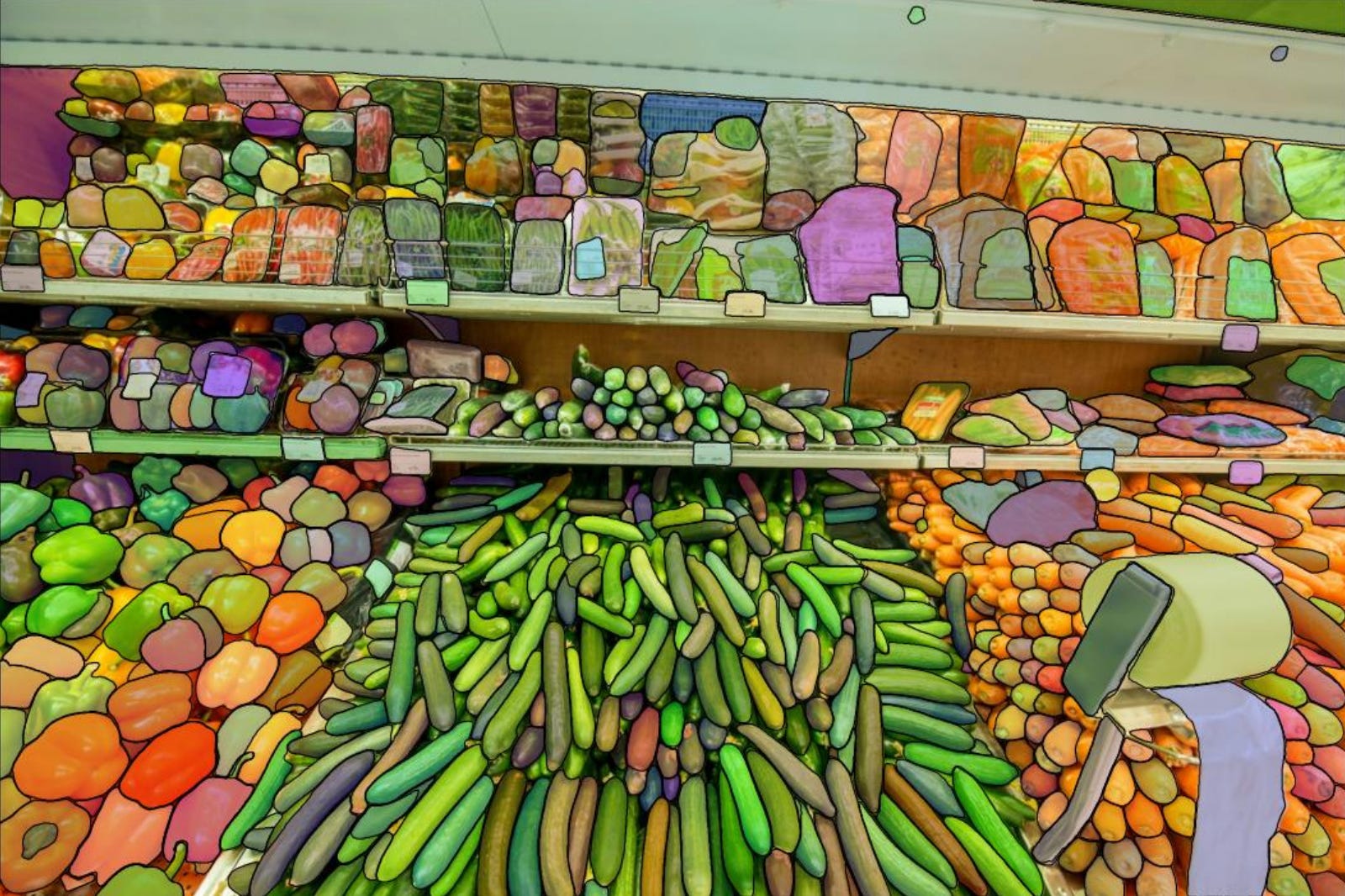
Figure 6. Interactive segmentation is valuable when a predicted mask can be corrected as an ordinary polygon instead of accepted or rejected as a whole.
Image matting is deliberately treated as a different output. A matte estimates continuous foreground opacity, which matters around hair, glass, smoke, and motion blur. Converting that alpha field into a polygon would destroy information, so matting outputs are stored as transparent foreground images rather than forced into the shape abstraction.
This exception is instructive: a unified representation should cover compatible data, not erase real differences between tasks.
Temporal identity: tracking and video segmentation
Tracking adds a time axis and a persistence constraint. Detection errors cause missed tracks; association errors cause identity switches. Both matter because a trajectory is more than a collection of correct boxes.
X-AnyLabeling uses a consistent group_id across frames to represent identity for boxes, oriented boxes, masks, or poses. Automated trackers can propagate objects; frame-level review and group management repair the result; MOT and MOTS exporters preserve the temporal structure for downstream training.
Interactive video segmentation concentrates human input on a small number of frames. With SAM 2, a user identifies a target using positive/negative points or a box, and the model propagates its mask through time. New prompts at a drifted or occluded frame can correct subsequent propagation. SAM 3 extends the interaction toward concept-driven discovery and tracking, where a text description may refer to multiple matching instances across a video.

Figure 7. Temporal propagation saves work only when corrections can be injected at the point where drift begins.
Structured prediction: pose, depth, counting, and documents
Pose estimation combines points with instance membership. The coordinates alone are insufficient: each keypoint needs a semantic type, visibility state, and connection to its person or object. A shared group_id binds the enclosing box and keypoints into one instance.
Depth estimation produces a dense continuous field rather than discrete objects. X-AnyLabeling can visualize and save Depth Anything outputs as grayscale or pseudocolor images for comparison with the source.
Counting appears scalar, but a single number is hard to audit. Few-shot counting systems such as GeCo and GeCo2 locate objects similar to one or more examples. By returning visible detections, the final count becomes an aggregation over inspectable evidence. Missed and duplicated instances can be found and corrected rather than hidden behind a number.
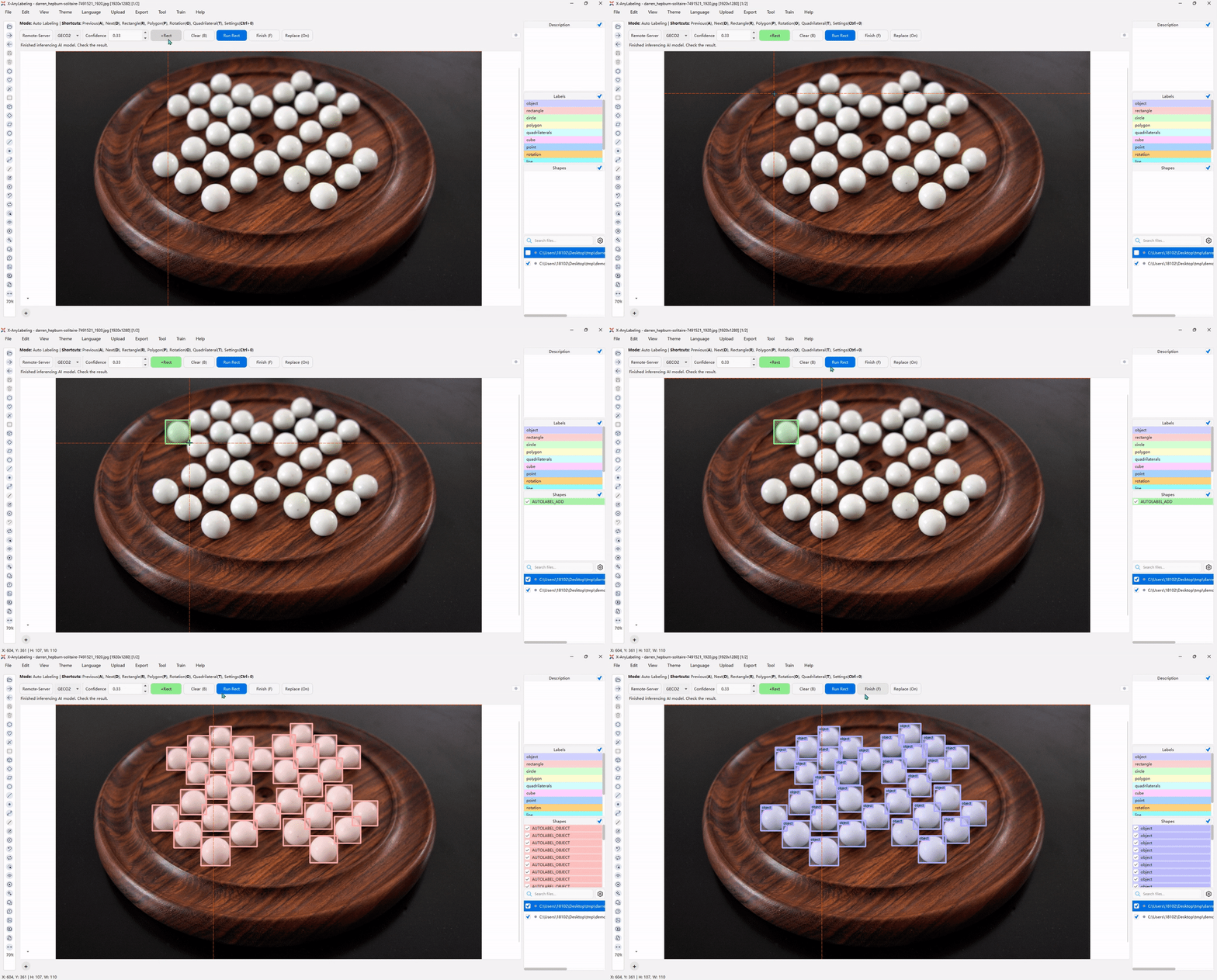
Figure 8. A count is more trustworthy when each contributing instance remains visible and editable.
Documents combine nearly every representation problem at once. Layout analysis identifies titles, text blocks, tables, figures, equations, headers, and footers. OCR associates a transcription with a rectangle, oriented box, or quadrilateral. KIE adds entity classes and key-value relations. Full document parsing must also preserve reading order and reconstruct structured outputs such as Markdown or JSON.
Errors compound across this pipeline. A wrong layout region routes content to the wrong recognizer; a wrong reading order corrupts context; recognition errors enter the final structure. For this reason, X-AnyLabeling links page regions to parsed blocks in both directions and provides type-appropriate editors for text, LaTeX, and tables.
Why some tasks need dedicated workflows
A generic canvas is powerful when the main action is editing geometry. It becomes awkward when the natural unit of work is a whole image, a time interval, a document block, or a conversation turn. X-AnyLabeling v4 introduces dedicated workspaces that reuse the shared project and model infrastructure while reorganizing interaction around each data type.
Image classification
The image classifier keeps the image preview, class selection, sample navigation, and progress state in one view. It supports mutually exclusive multiclass tasks and non-exclusive multilabel tasks. Label definitions can evolve during the project, while distribution statistics make imbalance and missing annotations visible.
Vision-language models can propose labels from the current candidate set and project instructions. Batch prediction reduces repetitive decisions, but every result returns as editable label state. The workflow is therefore not “ask a VLM for a label”; it is “apply one reviewable decision rule across a dataset.”
Video classification
Video classification often means temporal event labeling rather than assigning one class to an entire file. An event requires a start time, end time, class, and sometimes a textual description. The dedicated video workspace makes time intervals the primary annotation objects.
Users can move, trim, split, classify, and describe segments on a zoomable timeline. Frame stepping helps place ambiguous boundaries. A video-capable model may propose event intervals and descriptions, or add descriptions to intervals already chosen by a human. The latter mode is important when temporal boundaries are trusted but semantic summaries are expensive to write.
Document parsing
The PaddleOCR workspace treats images and multi-page PDFs as structured documents. Parsed page regions and result blocks are linked: selecting either side reveals its counterpart. Text, equations, and tables are edited with different controls because their error models differ.
Inference can use PaddleOCR's hosted API or a privately deployed X-AnyLabeling-Server. This gives teams a choice between immediate access and data-local execution without changing the review interface.
Visual question answering
VQA datasets do not share one universal schema. Some require only question and answer fields; others add task type, difficulty, split, attributes, or review status. The VQA workspace therefore uses configurable components—text fields, radio groups, checkboxes, and dropdowns—rather than hard-coding one form.
A vision-language model can fill a text field using the image, other questions and answers, and existing canvas annotations as context. This enables staged construction: a human can define the question, a model can draft the answer, and a reviewer can reconcile it with already verified detections or classifications.
Multimodal conversations
The chatbot workspace is not intended as a detached general chat client. It binds one- or multi-turn conversations to source images so that messages can be edited, regenerated, removed, reviewed, and exported as training data.
Cloud models, local models, and compatible private endpoints share one configuration layer. The same prompt can be applied to a directory with controlled concurrency, but results remain attached to individual samples. Batch generation therefore produces traceable records rather than an unstructured text dump.
Closing the loop with training
Annotation quality is ultimately tested by what a model learns from it. X-AnyLabeling's Ultralytics training workspace supports image classification, object detection, oriented detection, instance segmentation, and pose estimation. It brings dataset inspection, configuration, execution, monitoring, and model reuse into the same application.
Before training, the system summarizes valid samples and class distribution. A user can automatically split the dataset or restrict training to reviewed files. This is a small but consequential design choice: review state affects which samples are allowed to influence the next model.
During training, the workspace exposes task status, logs, progress, and evaluation plots. Finished weights can return to the auto-labeling workflow and propose annotations for new data. The resulting loop is:
label a small seed set
        ↓
train a task-specific model
        ↓
pre-label the next batch
        ↓
review failures and hard cases
        ↓
expand or repair the dataset
        ↺
This resembles active learning, but the product does not automatically guarantee an optimal sampling policy. The gain depends on how the next batch is selected, how uncertainty is calibrated, and whether reviewers focus on informative failure modes rather than merely accepting high-confidence predictions. The system provides the loop; the data strategy still matters.
Scaling inference without making the client heavy
Desktop inference is attractive because data stays local and setup can be simple. It becomes less attractive as models grow, CUDA and framework dependencies conflict, or several annotators need the same GPU. Installing every model environment on every workstation creates duplicated storage, inconsistent versions, and poor resource utilization.
X-AnyLabeling-Server separates the interaction plane from the compute plane:
Desktop client                         Inference server
--------------                         ----------------
file browsing        request           model loading
prompt interaction  ---------->        preprocessing
project state                           GPU execution
human review        <----------         structured result
native editing       response           queue/resource control
The client discovers available models and the interaction capabilities they declare. A server response containing boxes, masks, points, or text is converted into the same native objects used by local inference. The user's editing and review workflow does not change when compute moves across the network.
The server adds authentication, rate limiting, concurrency control, task queues, and logging. It can also host interactive video segmentation and multitask models without repeatedly loading the same weights for each user or task entry.
This architecture improves resource sharing, but it also introduces distributed-system concerns: network latency, request failure, model version drift, authorization boundaries, and the privacy implications of transmitting inference inputs. A private server reduces some risks; it does not remove the need for deployment and audit policy.
Extension as a set of stable boundaries
An open-source tool is technically extensible because its code can be changed. That is a weak form of extensibility: every customization may become a fork that is hard to maintain. X-AnyLabeling v4 instead separates extension into four layers.
| Extension layer | What changes | What remains reusable |
|---|---|---|
| Custom widgets | Prompts, thresholds, point/box inputs, task selectors | Window layout, events, state management |
| Custom models | Loading, preprocessing, inference, postprocessing | Native objects, batch inference, editing, review, export |
| Custom data flows | Ordering of generation, filtering, correction, and delivery | Files, models, components, project state |
| Remote inference | Runtime, dependencies, GPU allocation, deployment | Desktop interaction and data management |
Capability-driven interfaces
Different models require different controls. A detector may need confidence and class filters; open-vocabulary detection needs a text prompt; interactive segmentation needs positive/negative points or a box; a multitask model needs a task selector.
Models declare these needs through Meta.widgets, while remote models return equivalent widgets metadata from the server. The client constructs the relevant controls when a model is selected. A new model can therefore reuse existing interaction components instead of introducing a bespoke dialog.
The deeper idea is that the UI depends on capabilities, not model names. That makes local and remote models interchangeable at the interaction layer and reduces the amount of code required to integrate another architecture.
Adapting models at two levels
If an architecture is already supported, a user can often replace its weights and configuration—classes, thresholds, model paths—without changing the application. If the architecture is new, an adapter implements loading, preprocessing, inference, and postprocessing, then maps results to native annotations.
That last mapping is the integration boundary. Producing a NumPy array or JSON response is not enough; the output must enter the project's editable semantics. Once it does, single-image inference, batch pre-annotation, correction, review, and export become reusable.
Composing data flows
Some datasets require several models and a human decision between them. A custom data flow makes these stages explicit.
Consider referring-expression data. One pipeline could use RAM++ to propose candidate categories, Grounding DINO to locate instances, and a vision-language model to generate an initial expression from the full image or a target crop. A reviewer then corrects the box and text and checks whether the expression is unique, visually grounded, task-relevant, and factually accurate.

Figure 9. The output of one stage becomes structured input to the next. Human review is placed where semantic ambiguity cannot be resolved reliably by geometry alone. Source concept: GroundingME.
The benefit is not that every stage becomes automatic. It is that candidates, intermediate results, and corrections stay within one traceable data path. Any component can be replaced without discarding the rest of the workflow.
A concrete end-to-end example
Suppose we need an instance-segmentation dataset for a rare industrial defect. Only a few hundred images have been reviewed, the target boundary is irregular, and the final model must run locally.
1. Define the project schema. Use a polygon for the defect boundary, a class label for defect type, a difficult flag for ambiguous cases, and custom attributes for severity or material. Keeping these fields explicit is safer than encoding all semantics into long class names.
2. Produce a seed set. Annotators use the brush or magic wand for simple boundaries and point-by-point editing for difficult regions. Images are marked checked only after class, contour, and attributes have been reviewed.
3. Inspect the seed data. The data overview reveals class frequency and object types. Searches such as difficult::true and checked::false isolate unresolved work. Crop export creates a compact set of local regions for domain review.
4. Train a first model. Reviewed samples are exported or passed to the training workspace. The initial model does not need to be excellent; it only needs to reduce the cost of the next batch without causing reviewers to miss systematic errors.
5. Pre-label new images. The model produces masks that become editable polygons. Reviewers correct local edges with the polygon brush instead of redrawing complete shapes.
6. Analyze failure modes. Low-confidence search finds uncertain proposals, but confidence alone is not sufficient. The team should also sample confident predictions for systematic false positives, examine images with no predicted shapes, and compare performance across acquisition conditions.
7. Iterate. Corrected annotations enter the next training round. Once the model and dependency stack become too heavy for individual workstations, the same adapter can run on X-AnyLabeling-Server while the desktop review loop remains unchanged.
This example shows why the platform's components are more useful together than in isolation. Geometry tools, review state, search, training, and remote inference are different pieces of one error-correction system.
Performance and operational details
Interactive latency changes annotator behavior. If image switching is slow, users avoid revisiting samples. If a canvas freezes during batch inference, model assistance feels like interruption rather than acceleration. X-AnyLabeling v4 includes several optimizations aimed at keeping high-frequency operations responsive:
- Image-size inspection avoids decoding full pixel buffers when possible, while EXIF checks during directory import run asynchronously.
- GUI modules and configuration paths are loaded lazily so the main window can appear before nonessential tasks such as update checks finish.
- Server-side batching, queues, and concurrency can improve inference throughput and GPU utilization when configured for the workload.
- Canvas rendering avoids unnecessary deep copies and repeated refreshes during bulk visibility changes.
- Downloads, model refreshes, and batch inference run in worker threads with improved cancellation, cleanup, and GPU-memory release.
- Selection among overlapping objects prioritizes nearby editable vertices and edges, reducing the need to hide or move other shapes.
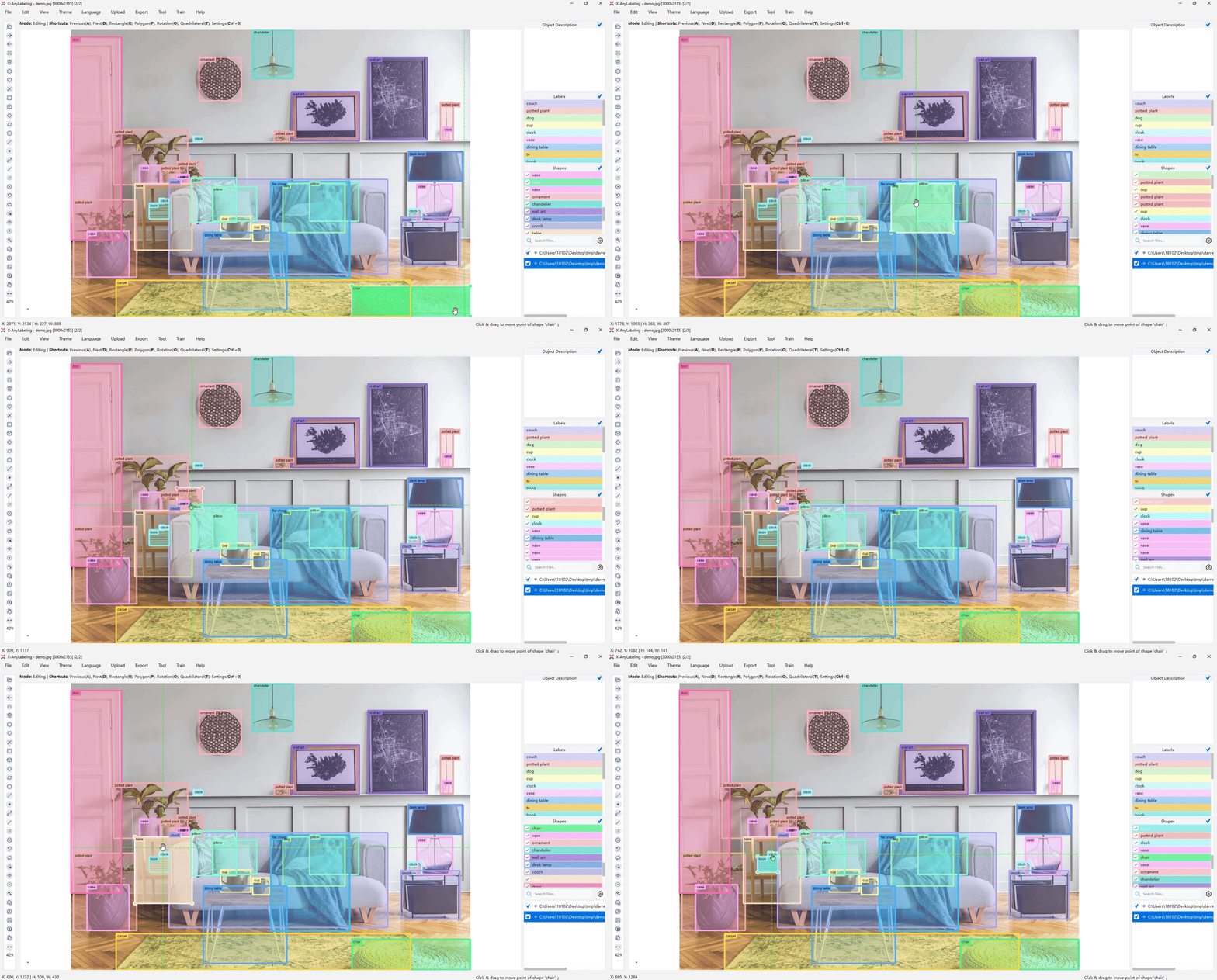
Figure 10. Small interaction-level optimizations compound because object selection occurs far more frequently than model installation or export.
File handling follows the same operational mindset. Images, nested directories, and common video formats can enter the project directly; HEIC, HEIF, and 16-bit grayscale images are supported; video frames join the same annotation and export path. EXIF orientation is normalized for display. Labels can be saved beside source files or in a separate output directory.
Deletion semantics are intentionally asymmetric. Removing an image moves it to a backup directory under the current task so accidental deletion can be recovered. Deleting a label file is irreversible. This behavior reduces risk to raw data, but users should still keep versioned backups of project annotations—especially before large batch operations.
Limitations and open questions
The unified architecture solves integration problems; it does not eliminate the underlying uncertainty of data production.
Model breadth increases maintenance pressure. Supporting many model families, runtimes, and export schemas creates a wide compatibility surface. A model being listed as supported does not imply equal speed, accuracy, hardware coverage, or maturity across all platforms.
Conversion can be lossy. A native project may contain attributes, relationships, review state, and continuous outputs that a target format cannot express. Geometry conversion is often an approximation, not a reversible rewrite. The native project should remain the authoritative artifact.
Human review can inherit model bias. Pre-annotations reduce drawing cost, but they also anchor reviewers. Systematic omissions are especially dangerous because an empty region attracts less attention than a visibly incorrect box. Quality control must include model-independent sampling, not only correction of surfaced predictions.
Confidence is not calibrated quality. A score can rank outputs within one model and dataset, but thresholds do not automatically transfer across classes, domains, or model versions. Search by score is a review aid, not a guarantee.
Remote inference changes the trust boundary. Centralized GPUs simplify dependencies and improve utilization, yet the deployment must define who can access inputs, outputs, logs, and models. Version pinning and provenance become more important when client and server evolve independently.
A closed training loop is not automatically active learning. Iterative annotation and retraining become most valuable when sample selection targets uncertainty, diversity, and known failure modes. Otherwise, the loop may simply reinforce the easiest portion of the data distribution.
New modalities will stress the current primitives. Audio, speech, and time-series data require temporal intervals, channels, alignment, and possibly hierarchical events. The existing workflow approach offers a path forward, but forcing every modality into image-shaped abstractions would weaken the design.
These limitations suggest a useful direction for future development: stronger provenance, versioned model and dataset lineage, configurable quality-control policies, and agentic orchestration that remains observable and interruptible. An agent may choose tools and decompose a data-production objective, but every intermediate result still needs an inspectable representation and a clear acceptance boundary.
Conclusion
X-AnyLabeling v4 is best understood not as a collection of annotation widgets or a launcher for vision models, but as a translation layer between three worlds:
- models produce heterogeneous predictions;
- humans reason through editable visual and semantic structures;
- training systems consume task-specific datasets.
The native shape model provides the common language. Dedicated workspaces acknowledge where geometry is no longer the right interaction primitive. Training and server components extend the loop in opposite directions—toward learning and toward scalable compute—while capability-driven widgets and adapters keep those changes from leaking through the entire application.
The design principle is simple: automation is valuable only when its output remains correctable, reviewable, and reusable. A box, mask, caption, document block, or conversation becomes durable data when it can survive the full path from proposal to human judgment to downstream learning.
That is the conceptual shift in v4. The platform is moving from AI-assisted drawing toward an open, lightweight data-production infrastructure in which models, people, and workflows can improve one another without losing the evidence in between.
References
- Chinese edition of this article
- X-AnyLabeling official website
- X-AnyLabeling on GitHub
- X-AnyLabeling documentation
- X-AnyLabeling-Server on GitHub
- Kirillov, A. et al. Segment Anything, 2023.
- Ravi, N. et al. SAM 2: Segment Anything in Images and Videos, 2024.
- Liu, S. et al. Grounding DINO: Marrying DINO with Grounded Pre-Training for Open-Set Object Detection, 2023.
- Segment Anything 3 project page.
- GroundingME paper.